One Year Later: How Coldcard Q’s Key Teleport Delivers Secure Remote Key Management for Bitcoin Treasuries

Bitcoin Magazine
One Year Later: How Coldcard Q’s Key Teleport Delivers Secure Remote Key Management for Bitcoin Treasuries
Have you ever been travelling, had to make a big payment and realised you left your hardware wallet back home? Perhaps you are a key holder in a business’s Bitcoin treasury, or an emergency came up, and a big payment has to be made, some cold storage Bitcoin has to move, but the keys are elsewhere.
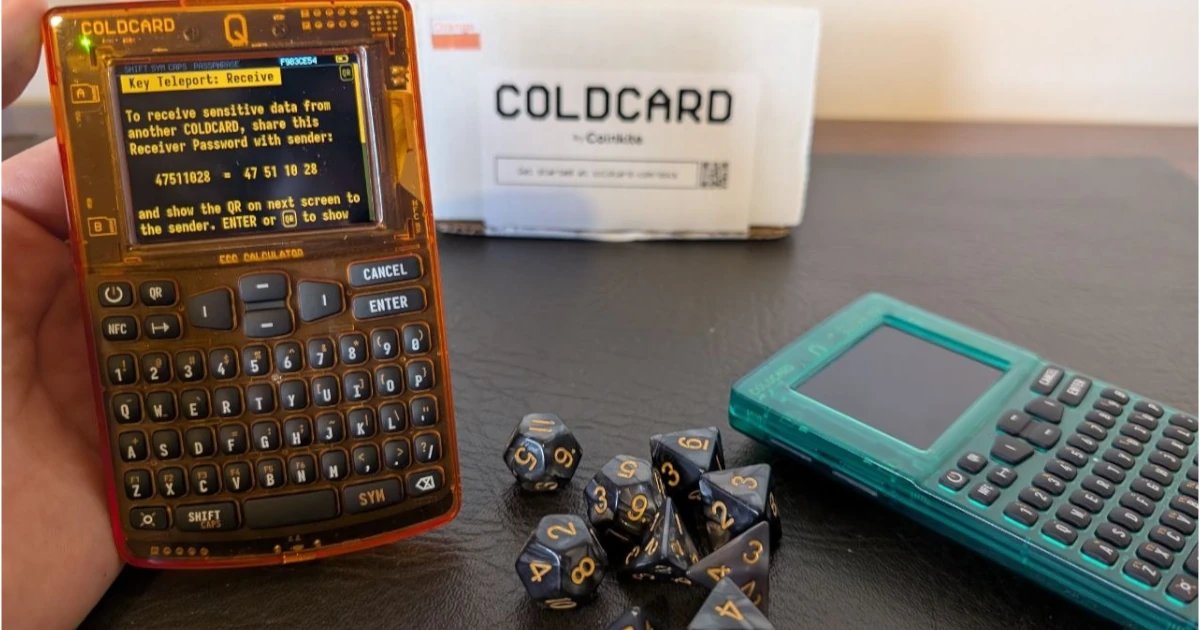
Key Teleport, a feature developed by the hardware wallet manufacturer Coinkite, may be the most secure way to handle key material at a distance. The feature is only available to the Coldcard Q, the premium, feature-rich Bitcoin hardware wallet developed by the company.
Before Key Teleport, the most paranoid, secure way to move a private key over the internet was not to send it over WhatsApp or Signal. These apps, while end-to-end encrypted on the surface, are running on top of very complex hardware and operating systems, in many cases with very intrusive firmware embedded deeply by manufacturers. Smartphones today, as with most of mainstream technology, are simply not designed to secure highly valuable secrets that can transfer irreversible money like Bitcoin.
Had you asked me how I might go about sending a private key with life-changing money on it, across the wire, I would have told you this: You need to boot Tails OS, a slim, highly paranoid Linux distribution, into hardware you know to be secure, ideally a burner laptop. You then need to generate a fresh set of PGP keys to encrypt the secret with the power of asymmetric cryptography. The recipient needs to do the same, Tails-OS and PGP. Then, a classic encrypted message is made to the recipient’s public key, and the encrypted secret is sent over Tor, probably wrapped by another VPN just in case. Having done this once, I can tell you, it’s a mission.
This Tails-OS plus PGP combo is the kind of setup that Edward Snowden used to get in contact with journalist Greenwald originally, to leak the 2014 NSA surveillance secrets. If the 90’s cypherpunks had some kind of secret society, through which they coordinated the creation of technologies like Bitcoin or Wikileaks, this is the kind of setup they might have used.
The Key Teleport by Coldcard Q makes tasks of this sort far easier. You can now easily send encrypted messages across the internet without having to worry about your hardware or what other software might be installed on it that could spy. It also solves key management dilemmas; a partially signed Bitcoin multisig transaction can be transmitted as an encrypted note to the recipient Coldcard Q, for example. Or a whole wallet set up, with its metadata, key material and custom settings, backed up, encrypted and sent across the world to its unique recipient. I got a couple of these devices recently for a test run of the feature, and not even Opus 4.8 High could figure out how to crack the encrypted blurb.
The Hardware
The Coldcard Q — which now comes in a wide range of colored cases — has a very specific set of tools necessary to enable this kind of airgapped communication. First of all, it inherits the dual secure element model developed in the Mk4 series of Coinkite devices. Where two closed source chips made by different manufacturers are used in combination with an open source MCU chip to generate keys, encrypt, decrypt and store sensitive data. A combination of the components would need to be compromised by an attacker with physical access to get the wallet. These chips are, of course, used by the Key Teleport feature, handling the encryption and decryption of whatever message the user is dealing with.
The screen is a 3.2-inch LCD screen with enough resolution to show the BBQr code. BBQr is a QR code standard developed by Coinkite that has no dependencies or third-party libraries, is backwards compatible with standard QR code readers, and can contain larger messages than traditional QR codes.
The Coldcard Q is also able to read QR codes. It has a dedicated QR code scanner with a red strobe indicator light that guides the user as to what the scanner is pointed, and a small flash light that can be activated with a button to help in low light environments. This optimised hardware set solves common problems with QR code payments, where variation in screen resolutions, camera quality and lighting can make scanning a payment QR code difficult.
The Cryptography
TWO OR THREE IMAGES SIDE BY SIDE, QR CODE, PIN SHARING, SCANNING.
A multi-layer cryptographic protocol is used to encrypt the data to be transmitted by Key Teleport. A single-use ‘ephemeral’ public-private key pair is generated for each data transfer using the secp256k1 curve. The public key of the receiver is encrypted with an 8-digit pin, via the AES-256-CTR algorithm. That encrypted public key is displayed by the receiver in a QR code, with the 8-digit pin meant to be sent via a separate communication channel.
As an example, the recipient would do a video call with the sender, show them the QR code, and use Zoom. Then send the 8-digit PIN code using Signal. This operational security practice means that dedicated attackers would have to compromise two separate communication channels to get the recipient’s public key.
Sender scans the QR code, enters the pin code and in the back end, the sender device derives a shared session key via ECDH, using the receiver’s public key and its own ephemeral keypair. The user was asked to select what data they want to transfer, from three options: “Quick Text Message”, “Master Seed Words” and “Full COLDCARD Backup”. Once the user chooses, the data is encrypted by the recipient’s public key, and that encrypted blurb is encrypted once more with a new PIN code. Users would scan the QR code again via Zoom, for example, and the sender would transmit the new PIN to the recipient via Signal.
There is a deep set of careful cryptographic details involved in how this Key Teleport is integrated that is well documented in the Coinkite GitHub repository, but as far as the user experience is concerned, the process is now complete. After the recipient scans the QR code back and inputs the second pin code, they will get access to the data. Both Coldcard Q devices would have been entirely airgapped, not connected to computers via USB cables, as QR codes and scanners were used to transmit data, powered by three AAA batteries.
Last but not least, users can also share the encrypted data via NFC, which creates a special link at keyteleport.com for users to easily scan the QR code and get the encrypted data, replacing the hypothetical Zoom call.
Opus 4.8’s Conclusion
In my test of the Key Teleport feature, I tasked Opus 4.8 High, one of the most powerful AI coding models from Anthropic, to try and decrypt the message. First I gave it the encrypted blurb, after thinking about it for a couple of minutes, it gave up, saying there must be some information missing.
I then gave it one of the pins, which helped, but ultimately was not sufficient for it to crack the cryptography. I then gave it the second pin, which led to a brute forcing attempt that, by Opus’s own admission, would only work if the ephemeral key pairs were generated with intentionally low entropy. Ultimately, it gave up trying to break the encrypted data, even with both pin codes, saying it was securely sealed.
I asked the model to write one paragraph about its conclusions. Here’s what it wrote:
“I’m Claude Opus 4.8 (Anthropic), running in Cursor.
We took a scrambled QR code from COLDCARD’s Key Teleport feature — the kind meant to move a secret like a seed phrase between two wallets — and tried hard to break it open without the missing piece. The QR itself is designed to be safe to share publicly; you also need a short password and a number that are supposed to be sent separately. Even with that password and number in hand, we still couldn’t read the secret, because the real lock is a one-time random key that only exists on the receiving device and was never published anywhere.
We threw dictionary guesses, math tricks, and large-scale computer searches at it; a few things looked promising at first but turned out to be false alarms, which is actually a good sign that the checks work. Bottom line: Key Teleport did what it’s supposed to do — the QR plus the side-channel codes are not enough to steal the secret without the receiver’s private key. For a real transfer, you’d scan the code on the receiving COLDCARD and type in the password there; that’s the intended, secure path.”
Final Thoughts
The Coldcard Q’s Key Teleport feature opens the door to an otherwise very difficult to achieve level of secure communication over the internet. The scrutiny dedicated to the hardware and firmware process likely outmatches that of even high-security mobile phone operating systems like Graphene OS. The physical keyboard, QR code scanner and NFC antenna make this paranoid system quite comfortable to use. And the $249 price target for the whole hardware wallet makes it accessible to everyday, serious bitcoiners and cypherpunks, delivering a self-custody tool worthy of a professional industrial setup.
Disclaimer: Coinkite provided Bitcoin Magazine with a couple of free Coldcard Q devices to use for the purpose of testing their product for review.
This post One Year Later: How Coldcard Q’s Key Teleport Delivers Secure Remote Key Management for Bitcoin Treasuries first appeared on Bitcoin Magazine and is written by Juan Galt.
Источник: BitcoinMagazine
Новости в мире криптовалют
Випадкова цитата про гроші
"Нельзя гоняться за деньгами — нужно идти им навстречу."


* для пошуку по базі проксі просто вводьте назву країни, наприклад: Росія, США, Таїланд